
Lovable: Day 2
🖼️ Image storage
I continued the second day where I left off the previous evening by adding support for more Markdown styling like subscript, superscript, and footnotes. Afterwards, I started out with images. I set up image storage⏤file storage is built in Lovable Cloud⏤and uploaded a test image. The agent created a table to match images in the database to posts, which is a more complicated solution than simply hard linking, but it was recommended, so I went with it. Looked okay at first, but I did not notice that the picture was placed at the top of the content rather than inline…
Thus the lion's share of the day was spent on the refinement of the import script. To have it find the image file from the relative URL and upload it to the bucket, then do away with the Liquid syntax Jekyll uses, and link the image in the imported post where it belongs inline correctly. There were several iterations of the solution which taught me a lot about how to prompt to achieve better results. Finally, a working solution emerged which processes both double-quoted and single-quoted src attributes, as well as matching simple markdown images. I also made my own life harder by using accented characters in image file names, so these needed to be sanitized for some of the regular expressions (regex) to work.
During the import, I ran into the issue with a post (the birthday one) in which there was no text, only an image. Of course, this broke the import script since the content being empty was not handled. I do expect similar issues as I keep importing old content.
I also had some refactoring done
- Renamed components that had 'Blog' prepended. I mean, I know what the site is, a component can just be Header instead of BlogHeader.
- Had the loading state extracted to a component so that both the index page and individual post pages⏤or any other future page⏤could use it. I also had the loading text swapped to a spinner.
- Fixed the issue of inline links not using transition on hover. Tailwind really makes this more complex than necessary in my experience.
- The footer was also extracted to a component for similar reasons.
- I also implemented styling for embedded content so they appear in a 16:9 aspect ratio.
- Liquid syntax had to be revisited because for some of the code snippets I used
{% highlight %}and{% raw %}to display.
🤔 Vite's chunk size limit
When I was testing locally, after a while, I started to get the following warning on build:
(!) Some chunks are larger than 500 kB after minification. Consider:
Using dynamic import() to code-split the application
Use build.rollupOptions.output.manualChunks to improve chunking: https://rollupjs.org/configuration-options/#output-manualchunks
Adjust chunk size limit for this warning via build.chunkSizeWarningLimit.
Now this limit seemed a little arbitrary for me, and why this is a problem is still going a little above my head, but a warning must be there for a reason, so I attempted to fix it. Half the internet was saying just increase the chunk size limit to some insane number and forget about it, a solution I very much disliked.
However, I found a post recommending vite-bundle-visualizer to see which chunks are contributing most to the size. My app looked like this:
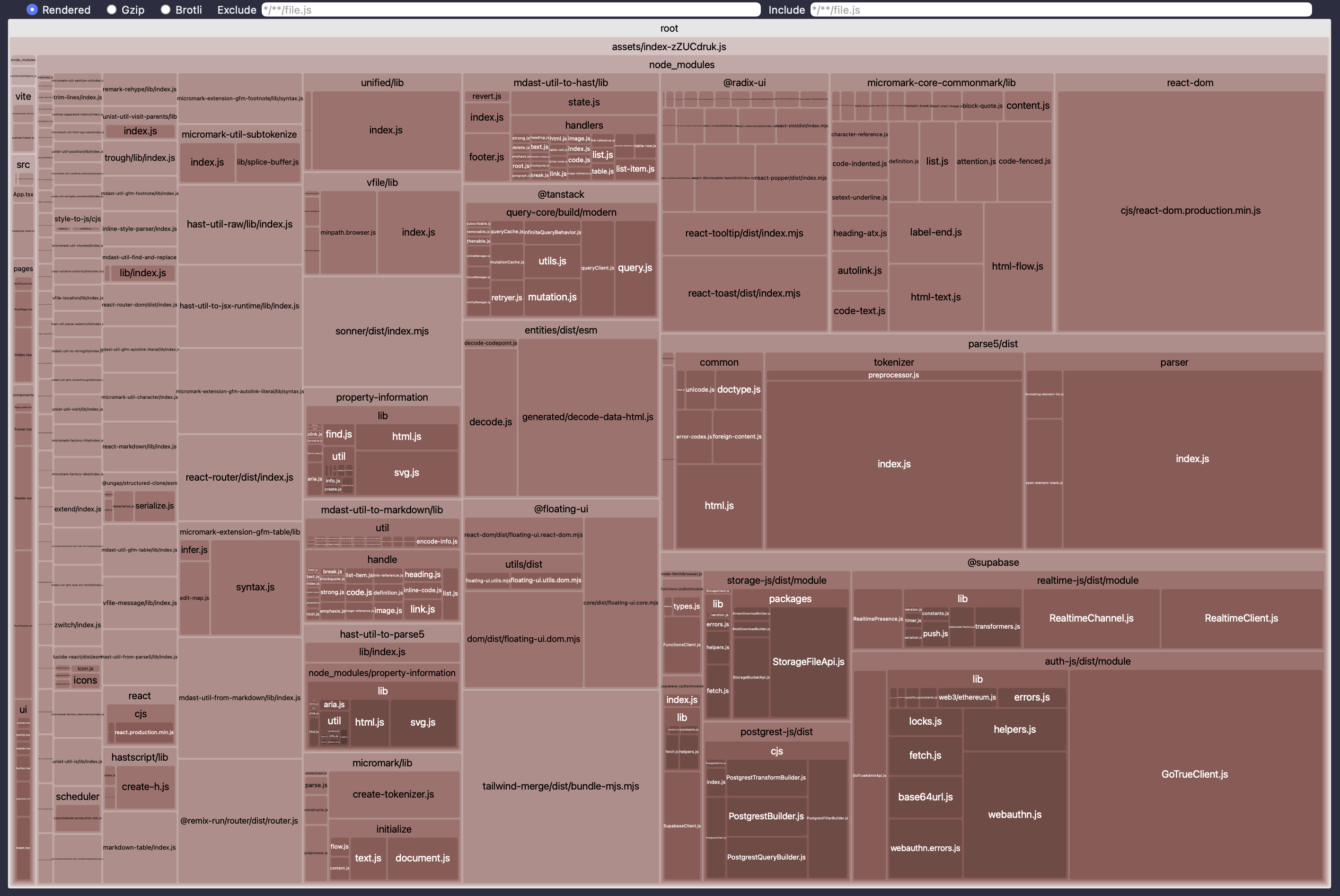
With a bit of agentic help, I came up with the solution to improve chunking by separating the three biggest contributors, react-dom, parse5, and supabase. Now I have neat, small chunks which made Vite happy.
build: {
    rollupOptions: {
      output: {
        manualChunks(id) {
          const vendors = ['parse5', 'react-dom', '@supabase'];
          for (const name of vendors) {
            if (id.includes(`node_modules/${name}`)) {
              // For @supabase, you might want to name the chunk without "@"
              return name.replace('@', '').replace('/', '-');
            }
          }
        }
      }
    }
  }
🌙 Dark mode
By the time I got back from the evening's run club training, it was dark, so I could ask Lovable to add dark mode colors. As I'm writing this, I realized that although it works if I arrive directly to the home page, it will not trigger when someone directly follows a link to a specific post. I'm adding it to the list of things to fix.